
Before You Withdraw
- Your withdrawal account (EasyPaisa or JazzCash) is in your own name.
- Any bonus turnover requirement is complete — check it under the bonus or wallet details.
- The amount is above the minimum withdrawal shown in the app.
- You have set a withdrawal password if the app asks for one.
How to Withdraw From Paisa X Go
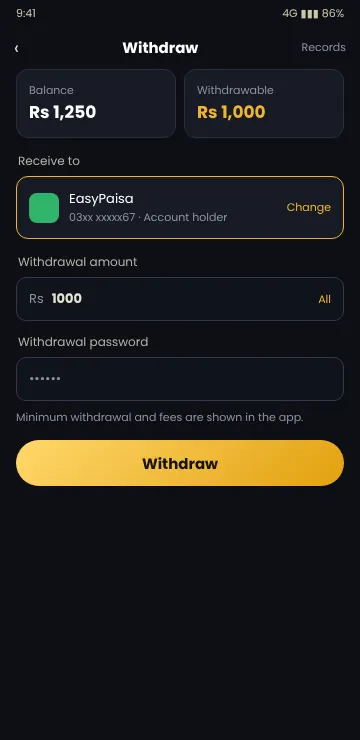
- Log in to Paisa X Go (see the login guide).
- Open Wallet and tap Withdraw.
- Add or select your EasyPaisa, JazzCash or USDT account.
- Enter the amount you want to cash out.
- Enter your withdrawal password and check the account number twice.
- Tap Withdraw and keep a screenshot of the request.
Paisa X Go Withdrawal Status Explained
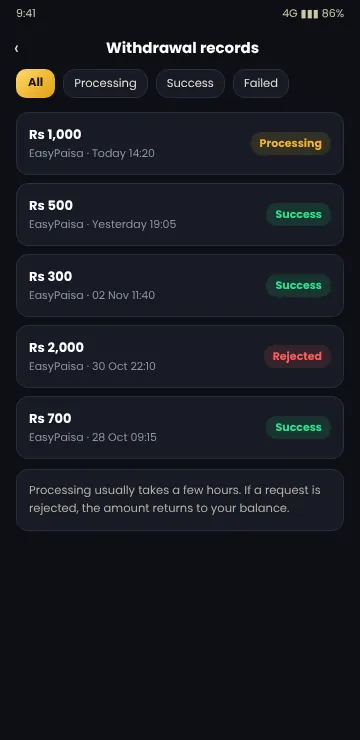
| Status | What it means |
|---|---|
| Processing | The request is waiting for approval and payment. |
| Success | Money has been sent to your wallet. |
| Rejected | The request was declined; the amount normally returns to your balance. |
Most requests are processed within a few hours, but some take up to 24 hours, especially at night or on holidays.
Download the latest APK and create your account in a few minutes. 18+ only.
Why Is My Paisa X Go Withdrawal Pending or Rejected?
Turnover not complete
Bonus money usually has to be bet a set number of times before it can be withdrawn.
Name mismatch
The wallet name does not match the account details, or the wallet belongs to someone else.
Wrong account number
A typing mistake in the wallet number. Check and add the correct account.
Account review
Multiple accounts or unusual activity can put a withdrawal on hold.
Never Pay a Fee to Unlock a Withdrawal
If someone says you must pay a “tax”, “unlock fee”, “VIP upgrade” or “verification charge” before your Paisa X Go withdrawal is released, do not pay. Genuine withdrawals do not require you to send more money.
How to Get Help
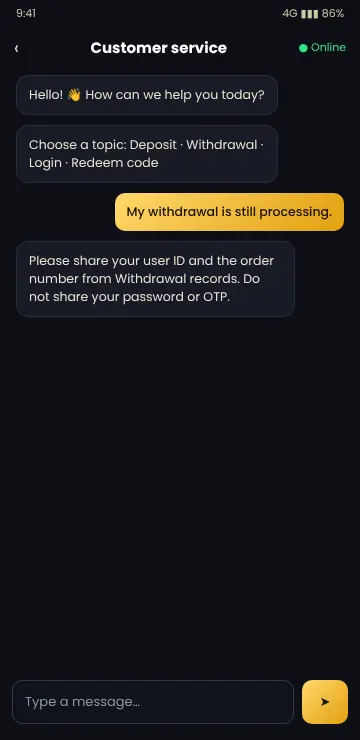
If a withdrawal stays in Processing for more than 24 hours, contact in-app customer service with your user ID, the order number and screenshots. Read our Paisa X Go customer care guide for safe ways to reach support.
- Do not create a new account to try again.
- Do not share your OTP, password or wallet PIN.
- Keep all screenshots until the money arrives.
Frequently Asked Questions
How do I withdraw from Paisa X Go?
Open Wallet, tap Withdraw, select your EasyPaisa, JazzCash or USDT account, enter the amount and confirm with your withdrawal password.
How long does a Paisa X Go withdrawal take?
Most are completed within a few hours. Some can take up to 24 hours.
What is the minimum withdrawal in Paisa X Go?
The minimum is shown on the withdraw screen and can change. Check it before you request.
Why was my Paisa X Go withdrawal rejected?
Common reasons are incomplete bonus turnover, wrong account details or a name mismatch. The amount normally returns to your balance.
Someone asked me to pay a fee to release my withdrawal. Is it real?
No. Never pay any fee, tax or charge to unlock a withdrawal. It is a scam.
Conclusion
To withdraw from Paisa X Go, use a wallet in your own name, finish any bonus turnover and enter the account details carefully. Keep screenshots and never pay to unlock a withdrawal. To add money again, see the deposit guide.
18+ only · Play responsibly