
Paisa X Go Login Details
| Detail | Information |
|---|---|
| Login ID | Registered mobile number with +92 |
| Password | 6–16 characters you set at registration |
| Login options | Android app and web version (online login) |
| Password reset | SMS OTP to the registered number |
| Who can log in | Registered users aged 18+ |
How to Log In to Paisa X Go (App)
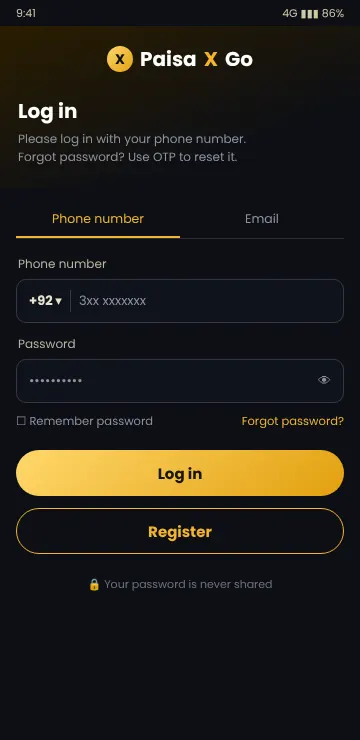
- Open the Paisa X Go app on your phone.
- Tap Login at the top or bottom of the home screen.
- Select the Phone number tab and keep the country code as +92.
- Type your number without the first 0 (for example 3xx xxxxxxx).
- Enter your password and tap Log in.
Tick “Remember password” only on your own phone. On a shared phone, log out after playing.
Paisa X Go Online Login (Web Version)
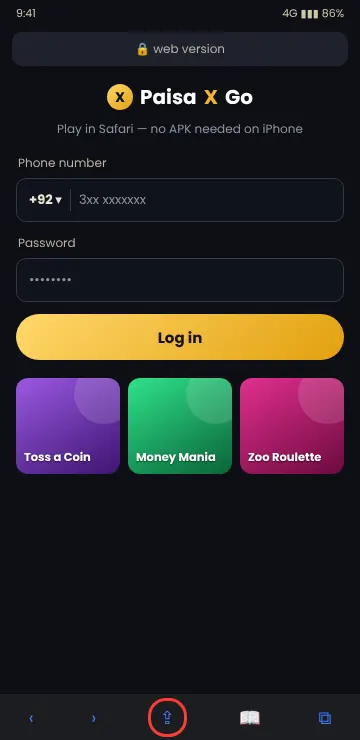
If you cannot install the APK — for example on an iPhone or a work laptop — you can use the Paisa X Go online login in a browser. The account is the same, so your balance and VIP level show up on both.
- Tap Download APK on this page to open the app’s own page in your browser.
- Choose the web / play online option if it is offered.
- Enter your +92 number and password and tap Log in.
- On iPhone, use Safari’s Add to Home Screen to keep a shortcut.
Paisa X Go Login and Registration: New User?
You cannot log in without an account. Searches like “Paisa X Go login registration” usually come from new users. Create your account first with our Paisa X Go register guide — it takes about two minutes and needs only your mobile number and an OTP. If you have not installed the app yet, start with the Paisa X Go download.
Forgot Your Paisa X Go Password?
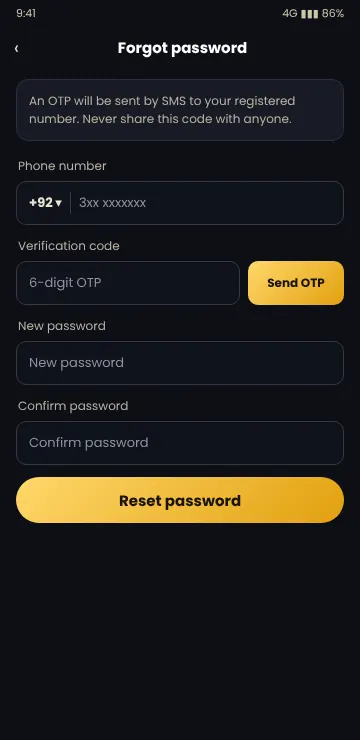
- On the login screen, tap Forgot password?
- Enter your registered +92 mobile number.
- Tap Send OTP and type the 6-digit code from the SMS.
- Set a new password and type it again to confirm.
- Tap Reset password, then log in with the new password.
Paisa X Go staff will never ask for your OTP or password. Anyone who asks for it on WhatsApp, Telegram or a call is trying to take over your account.
Download the latest APK and create your account in a few minutes. 18+ only.
Paisa X Go Login Problems and Fixes
“Wrong password”
Check Caps Lock and spaces. If it still fails, reset the password with OTP instead of trying many times.
“Account does not exist”
You may have registered with another number or typed the leading 0. Enter the number after +92 without 0.
OTP not received
Wait 60 seconds, check signal and SMS inbox, and make sure DND or SMS blocking is off. Then tap Send OTP again.
App asks to update
Old versions are blocked at login. Install the latest APK from our download guide and log in again.
Network error
Switch between Wi-Fi and mobile data, or restart the app. Some VPNs also block the login.
Account blocked
Contact in-app customer service with your user ID. Do not pay anyone who offers to “unblock” it for a fee.
After You Log In
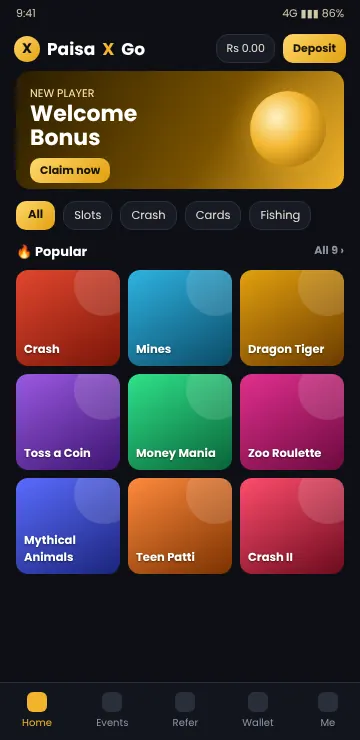
Once you are inside, the home screen shows your balance, the Deposit button and the games list. From here you can:
- Add money — see the deposit guide.
- Cash out — see the withdraw guide.
- Enter a gift code — see Paisa X Go redeem code.
- Check VIP level, daily rewards and invite link under Events and Refer.
Use a password you do not use anywhere else, keep your SIM under your own name, and log out on shared phones.
Frequently Asked Questions
How do I log in to Paisa X Go?
Open the app, tap Login, enter your +92 mobile number and password, and tap Log in.
Can I log in to Paisa X Go online without the app?
Yes, if the web version is available you can log in from a browser with the same number and password.
I forgot my Paisa X Go password. What should I do?
Tap Forgot password, enter your number, verify the SMS OTP and set a new password.
Why is my Paisa X Go OTP not coming?
Check signal, wait a minute, make sure SMS from short codes is not blocked, then request the OTP again.
Can I use Paisa X Go login in Pakistan with any SIM?
You can register with any Pakistani mobile number that can receive SMS. Use a number registered in your own name.
Can I log in on two phones?
Usually yes, but logging in on a new device may log you out on the old one. Never share your login with others.
Conclusion
Paisa X Go login is simple: +92 number, password, and an OTP if you need to reset. Keep the app updated, never share your OTP, and if you do not have an account yet, start with the register guide.
18+ only · Play responsibly